Skip to navigation Skip to content
Your Simworks Cart
simworks studios logo transparent
€0.00 0
  • Home
  • Shop
    • Flight Simulator 2024
      • Aircraft
    • Flight Simulator 2020
      • Aircraft
      • Scenery
    • Gift Card
    • My Wishlist
    • My Cart
  • In Development
  • Help
    • Product Manuals
    • Support
    • Product Changelogs
  • About
    • Contact Form
Useful Links
  • My Account – Login
  • Orders
  • Documentation
  • Encyclopedia
  • Wishlist
  • Logout
€0.00 0

F-4B/N Phantom II Manuals

16
  • F-4B Phantom II (Both) – Known Issues
  • F-4B Phantom II (Legacy) – Installation help
  • Electronic Warfare equipment and Countermeasures
  • Air-to-Ground weapons
  • Air-to-Air weapons
  • Weapon control panels
  • Checklists
  • Automatic Carrier Landing System
  • Navigation equipment
  • Air Data Computer
  • Basic aircraft systems
  • Aircraft configuration manager
  • Fleet Placer
  • Payload manager
  • General information & specifications
  • Main Manual of F-4B/N Phantom II

Midway Battlegroup Manuals

3
  • Midway Battlegroup – Known Issues
  • Midway Battlegroup – Installation Help
  • Main Manual of Midway Battlegroup

Live Scenery Manuals

1
  • Live Scenery Options

Nimitz Class Manuals

1
  • Nimitz Class – Main Manual

T-37B Tweet Manuals

2
  • T-37B Tweet – Main Manual
  • T-37B Tweet – Installation help

Carriers Extended Manuals

2
  • Carriers Extended! SDK (CEX SDK)
  • Carriers Extended: US Navy
View Categories
  • Home
  • Documentation
  • Legacy Manuals
  • F-4B/N Phantom II Manuals
  • Main Manual of F-4B/N Phantom II

Main Manual of F-4B/N Phantom II

Estimated Reading Time: 2 min read

Disclaimer #

This product is an artistic representation of the subject matter. SimWorks Studios Ltd. does not endorse or is endorsed in any way by the manufacturer of the subject matter. The subject matter and is simulated within the limitations of the Flight Simulator X SDK and the product and/or its manuals are not to be used as a substitute to real-world training.

Credits and thanks #

Thank you for your interest in our F-4B/N Phantom II packages. The SimWorks Studios F-4B/N Phantom II is a product of great effort and love for one of the most iconic aircraft ever made. We would also like to thank the various people that assisted in the research and developement of this project. Many members of the Sim-Outhouse community provided us with invaluable research material, insight to the aircraft and testing. We would also like to thank our beta testing team which provided us with a lot of headaches and invaluable feedback during the developmen cycle. Our early customers, who supported us not only with their wallets but also with constructive criticism that led us to improve usability and quality even further. Lastly, the development team:

F-4B Phantom II PBR upgrade:

  • Jamal Ingram: Exterior model upgrades
  • Matt Wynn: Exterior textures
  • Alex Vletsas: Interior model upgrades
  • Elias Strikos: Cockpit textures

Legacy F-4B Phantom II:

  • Jamal Ingram: Exterior model, and TacPack coding
  • Alex Vletsas: Interior model, Coral Sea modeling, XML coding and management
  • Panayiotis Delizisis: Flight dynamics, F-4 repaints and Coral Sea texturing
  • Thanasis Delizisis: Flight dynamics
  • Nicolas Nastri: Paintkit, VC and Exterior texturing
  • McFarland Masterton: Carrier Extensions v2.0, Autopilot
  • Orion Lyau: Carrier Extensions v1.0

We would also like to extend our special thanks to Tom Aguilo for XMLTools, which made possible many major features of this aircraft. Doug Dawson for his dsd2xml module, allowing us to enrich our audio environment. MilViz for their marvelous RADAR and lighting technology that is integrated herein. Finally, Rich Slater for doing some specialized groundwork for us.

The following sections are devoted to the product as a user manual, allowing you to operate the F-4B/N to its full capability and familiarize yourself with its features.

Settings #

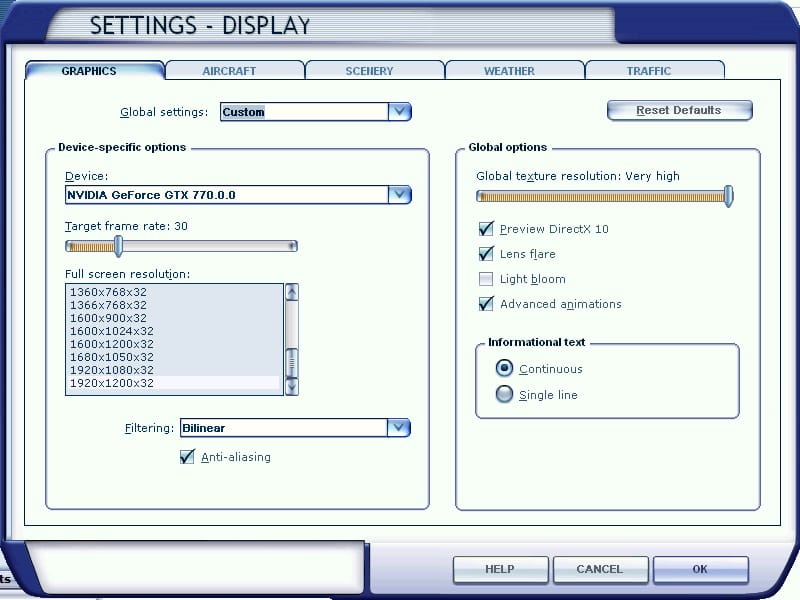
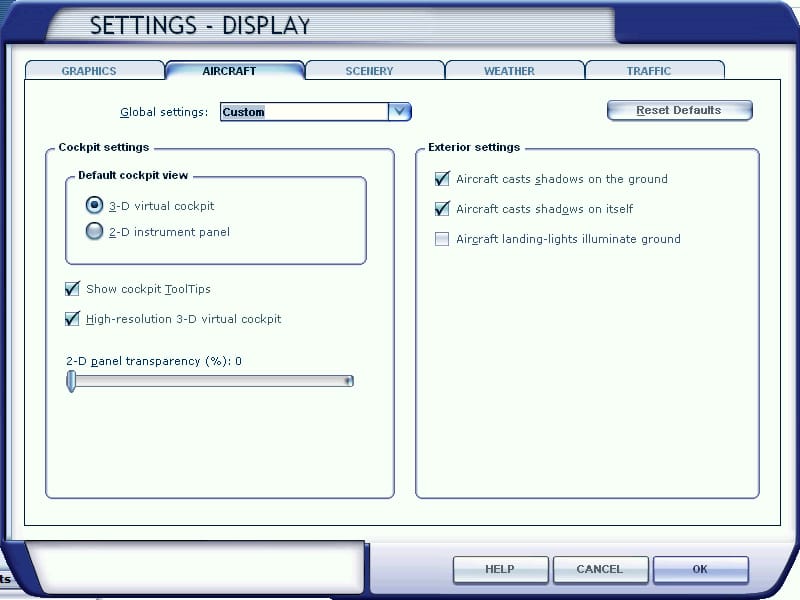
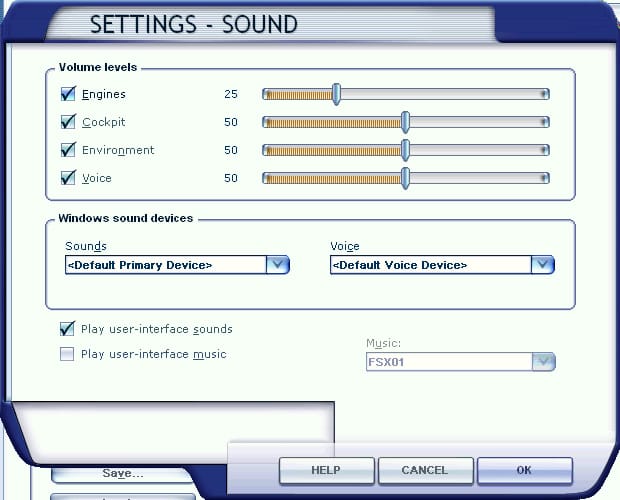
For the best possible experience we recommend the settings as shown in the images below.

  • Graphics
    • Prepar3D v4/5: 4096x for GPUs with more than 6GB of VRAM. 2048 otherwise. Also, ensure “Mipmap VC panels” is turned off.
    • FSX: Global texture resolution: Maximum
      • To see 4096 textures in FSX, you may need to edit fsx.cfg located in %appdata%\Microsoft\FSX and add/change the TEXTURE_MAX_LOAD=1024 line to TEXTURE_MAX_LOAD=4096. The line is in the [GRAPHICS] section.
    • Advanced animations: ON (Required)
    • Target frame rate: 30 (depending on preference it may go higher or lower)
  • Aircraft
    • Show tooltips: as desired
    • High resolution virtual cockpit: ON
  • Sound: our testing indicates that the aircraft feels best when engine sounds are half the volume of the other sounds. Recommended:
    • Engines: 25%
    • Other settings: 50%
Graphics setting
Aircraft settings
Sound settings

Aircraft Manuals #

Notice to Steam customers #

Certain features have been reduced or are not included in the version available on the Steam Store. Reduced features are marked with an asterisk (*) and removed with two asterisks (**).

Chapters #

  • Overview
    • General information & specifications
    • Forward cockpit familiarization
    • Rear cockpit familiarization
    • Payload manager*
    • Aircraft configurator app**
    • Using the Coral Sea (link to Midway manual)
    • Aircraft configuration manager
  • Systems and procedures
    • Basic aircraft systems
    • Air data computer
    • Navigation equipment
    • Automatic Carrier Landing System
    • Checklists
  • Combat employment
    • Weapon control panels
    • Air-to-Air weapons**
    • Air-to-Ground weapons**
    • Electronic Warfare equipment and Countermeasures*

Power user’s guide #

  • Repainter’s guide
Updated on 12/05/2025

How useful was this article?

  • Happy
  • Normal
  • Sad

Share This Article :

  • Facebook
  • X
  • LinkedIn
  • Pinterest
General information & specificationsF-4B Phantom II (Both) – Known Issues
Table of Contents
  • Disclaimer
  • Credits and thanks
  • Settings
  • Aircraft Manuals
    • Notice to Steam customers
    • Chapters
  • Power user's guide

Shop

  • FS2020 Aircraft
  • FS2020 Scenery
  • FS2024 Aircraft
  • Gift Card

Account

  • My Account
  • My Orders
  • Wishlist
  • Documentation
  • Support

About

  • Blog
  • Community
  • Terms & Conditions
  • Privacy Policy
  • Brand Assets
  • Collaborate

Follow Us

Discord Facebook X-twitter Youtube
© 2026 Simworks Studios LTD. All rights reserved
simworks studios payment icons white
Simworks Studios
Manage Consent
To provide the best experiences, we use technologies like cookies to store and/or access device information. Consenting to these technologies will allow us to process data such as browsing behavior or unique IDs on this site. Not consenting or withdrawing consent, may adversely affect certain features and functions.
Functional Always active
The technical storage or access is strictly necessary for the legitimate purpose of enabling the use of a specific service explicitly requested by the subscriber or user, or for the sole purpose of carrying out the transmission of a communication over an electronic communications network.
Preferences
The technical storage or access is necessary for the legitimate purpose of storing preferences that are not requested by the subscriber or user.
Statistics
The technical storage or access that is used exclusively for statistical purposes. The technical storage or access that is used exclusively for anonymous statistical purposes. Without a subpoena, voluntary compliance on the part of your Internet Service Provider, or additional records from a third party, information stored or retrieved for this purpose alone cannot usually be used to identify you.
Marketing
The technical storage or access is required to create user profiles to send advertising, or to track the user on a website or across several websites for similar marketing purposes.
  • Manage options
  • Manage services
  • Manage {vendor_count} vendors
  • Read more about these purposes
View preferences
  • {title}
  • {title}
  • {title}
Simworks Studios
Manage Consent
To provide the best experiences, we use technologies like cookies to store and/or access device information. Consenting to these technologies will allow us to process data such as browsing behavior or unique IDs on this site. Not consenting or withdrawing consent, may adversely affect certain features and functions.
Functional Always active
The technical storage or access is strictly necessary for the legitimate purpose of enabling the use of a specific service explicitly requested by the subscriber or user, or for the sole purpose of carrying out the transmission of a communication over an electronic communications network.
Preferences
The technical storage or access is necessary for the legitimate purpose of storing preferences that are not requested by the subscriber or user.
Statistics
The technical storage or access that is used exclusively for statistical purposes. The technical storage or access that is used exclusively for anonymous statistical purposes. Without a subpoena, voluntary compliance on the part of your Internet Service Provider, or additional records from a third party, information stored or retrieved for this purpose alone cannot usually be used to identify you.
Marketing
The technical storage or access is required to create user profiles to send advertising, or to track the user on a website or across several websites for similar marketing purposes.
  • Manage options
  • Manage services
  • Manage {vendor_count} vendors
  • Read more about these purposes
View preferences
  • {title}
  • {title}
  • {title}